Table of Contents
Freemium Analysis
Home
The Home Screen for the freemium users is shown below.:
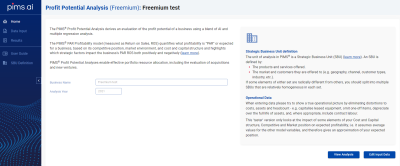 Enter the name of your business and the year for which you will be entering data.
If you have already entered data for the business, you can click on the View Analysis button to go straight to the output screen, otherwise click the Next or Edit Input Data button to progress to the Data Input sections to define your data.
Data Input
Business Profile
The first Data Input section, Business profile, defines key structural factors for your business. In freemium mode this comprises just 4 fields:
- The currency used entering financial
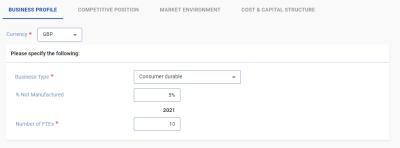 data
data - Business Type: an overall business classification into 1 of 6 categories.
- The % of products not manufactured: What percentage of your sales involve no manufacturing process at all (e.g. services or bought in goods).
- The number of employees in the business unit.
Press Next to move to the next section.
Competitive Position
The Competitive position page asks for the following fields:
- Your market share in value terms.
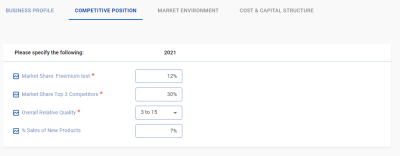
- The combined share of the 3 largest competitors in the market excluding your business.
- The relative perceived quality of your business.
- The % of your sales that come from new products.
It is important to correctly define your market, making it too broad means you are not necessarily competing with the largest competitors and understates your share (i.e. if you are competing in a specific region but are considering the worldwide market), or you define it too closely and ignore competing technologies.
Relative quality is a measure of your business’ performance on non-price attributes relative to your competitors from your customers perspective. A value of less than zero indicates that your customers think you have a worse than average quality relative to competitors, greater than zero that they think you have a better than average quality product compared to your competitors. The range goes from -50 to +50 with the extremes representing very large differences in quality.
The definition of new products does not include things like changes in pack sizes or slight modifications to existing products but step changes, offering a new function to an existing market or an existing product to a new market.
Press Next to go to the next page, Back to go back to the business profile page.
Market Environment
In freemium mode you are asked for just 4 fields in the Market Environment section:
- Real Market Growth, which is the
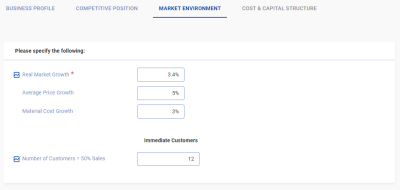 inflation adjusted average annual market growth rate.
 - Average Price Growth, which, as it says is the average annual change in prices.
- Material Cost Growth, which is the annual percent change in the cost of your purchases due to price inflation.
- The number of immediate customers = 50% sales. Thisis the smallest number of customers who you sell to directly who account for half of your sales value and is an indication of how reliant you are on a small number of customers.
Clicking Next takes you to the Cost & Capital Structure section. Here, again, we only ask for very limited financial data in freemium mode.
Cost & Capital Structure
- Sales revenue is the sales value in the currency entered in the business profile section.
The following fields can either be entered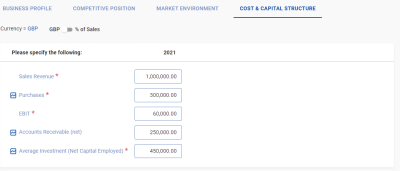 (and displayed) as values or as a % of sales by switching the toggle at the top of the screen:
- Purchases: The cost of raw materials, energy, and inbound freight.
- EBIT: net earnings (profit) before investment and tax.
- Accounts Receivable: the average value of receivables during the year, net of allowances for bad debts
Once you have finished entering data press Finish to proceed to the Results Output.
Results
In freemium mode, because of the limited data we provide only general pointers to expected profitability and the drivers responsible for performance. The analysis screen is divided into 3 sections:
Profitability
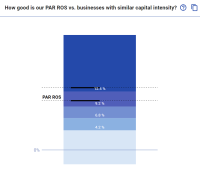 This section has two charts.
The first shows the distribution of PAR ROS for businesses with similar capital intensity to yours, and is a measure of how your PAR ROS (represented as a range between 2 black bars) compares. The charts is divided into 5 ranges (or quintiles) with the middle bar representing average values. In this case the range of PAR for this business is above average, i.e. it's potential is above average.
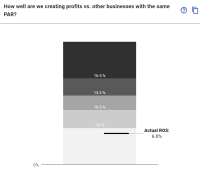 The second chart shows the quintiles of the expected distribution of Return on Sales for businesses like yours and your actual return on sales plotted on it. If you are in the middle category you are close to your expected PAR, which we would expect to be in this range. Below this, you are underperforming your strategic position and should look at your cost profile for potential improvements. Above it, you are probably outperforming your strategic potential and need to address strategic improvements to maintain that performance.
Impacts on Profit Potential
This section divides the factors affecting expected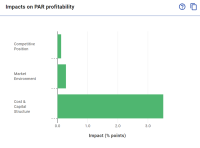 profitability into 3 sections and shows their relative impact on expected profitability. In this example there is a big positive impact from the cost and capital structure, indicating a strong financial position, a slight positive impact from the market environment factors and a vert small impact from the competitive position factors indicating that there may be a weak quality and / or relative market share.
Key Drivers of Profitability and Growth
The bottom section shows two charts.
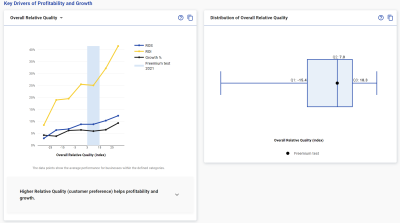 To the left are charts detailing the relationship between key factors and profitability and growth from the PIMS research database with your data plotted in the same way as in the input sections.
The chart to the right shows the distribution of that data in the PIMS database as a Box and whiskers chart, the end points represent the maximum & minimum and the box the middle 50% of businesses for that variable.
To the left are charts detailing the relationship between key factors and profitability and growth from the PIMS research database with your data plotted in the same way as in the input sections.
The chart to the right shows the distribution of that data in the PIMS database as a Box and whiskers chart, the end points represent the maximum & minimum and the box the middle 50% of businesses for that variable.
Next: Paid Analysis