
This is an old revision of the document!
Table of Contents
Paid Analysis
Home
Paid users can select up to 4 years of data for analysis, and, if you have paid for more than one business to analyse, you can click the + button to create a new business.
 If you have already entered data for the business, you can click on the View Analysis button to go straight to the output screen, otherwise press the Next or Edit input data button to progress to the Profile screens to enter your data.
Data Input
Business Profile
At the top of this section you define the currency and scale to use when entering financial data. The rest of the screen is split into 2 sections:
The first section defines key structural factors for your business:
- The currency used entering financial
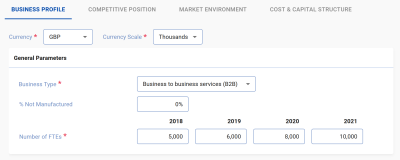 data
data - Business Type: an overall business classification into 1 of 6 categories.
- The % of products not manufactured: What percentage of your sales involve no manufacturing process at all (e.g. services or bought in goods).
- The number of employees in the business unit.
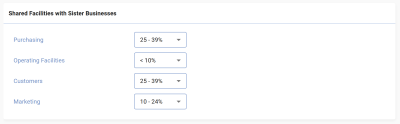 The second section details resources such as plant, marketing and customers which are shared with other
businesses in the company. Like many fields in the softwarethese comprise drop down menus with a range of choices rather than asking for precise numbers.
The second section details resources such as plant, marketing and customers which are shared with other
businesses in the company. Like many fields in the softwarethese comprise drop down menus with a range of choices rather than asking for precise numbers.
Press Next to move to the next section.
Next: The PAR ROS Model