
This is an old revision of the document!
PIMS Business Analysis Software
The PIMS® Business Analysis derives an evaluation of the profit potential of a business using a blend of AI and multiple regression analysis.
The PIMS® PAR Profitability model (measured as Return on Sales, ROS) quantifies what profitability is “PAR” or expected for a business, based on its competitive position, market environment, and cost and capital structure and highlights which strategic factors impact the business’s PAR ROS (both positively and negatively).
The unit of analysis in PIMS® is a Strategic Business Unit (SBU). It is critical that you define an SBU and its market correctly to obtain accurate results.
We use PAR ROS as a measure of profitability rather than ROI because a significant proportion of businesses these days have nearly zero or negative investment and therefore resource allocation is about people, R&D, marketing etc. not investment. For more details and definition of the variables in the model click here.
 The software runs in two modes:
As a Freemium product a limited data set is entered for a single business for a single year and approximate values are generated for the expected position and the key categories driving PAR.
Paid users can enter more detailed data for up to 4 years and get a more precise PAR profitability, time series analysis and more detailed outputs on the drivers of PAR profitability. Additionally, paid users can add Strategic Peer Analysis which identifies opportunities for improving actual and PAR profitability and growth.
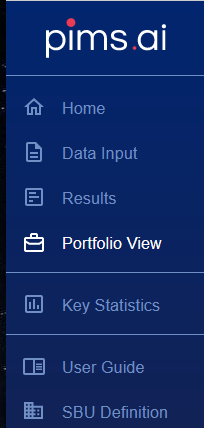
The main steps in analysis are detailed on the left side menu, shown here.
- Home selects the business and timeframe for analysis
- Data Input details the business and market characteristics and is active when you have selected a business for analysis from the Home screen.
- Results displays the outputs and is active when you have selected a business and entered sufficient data for analysis.
- Portfolio View Is available to paid users who have analysed more than one business and displays their results together. .
- User Guide opens this guide.
- SBU Definition opens a popup window detailing information on defining a business unit.
The currently selected option is shown in white.
In both freemium and Paid mode the Data Input section is divided into 4 tabs addressing different aspects of your business: basic information on the Business Profile page; your Competitive Position vs key competitors; the Market Environment you compete in; and Cost & Capital Structure metrics. 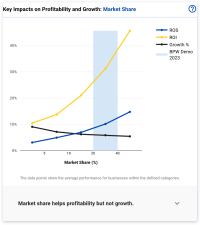
On all Data Input sections, hovering over the name of a field will display more details on what should be entered. Mandatory fields are denoted by an asterisk and must be entered before leaving a page.
In both freemium and paid modes, when you are in the Competitive Position, Market Environment and Cost & Capital Structure sections charts are shown on the right of the screen detailing the relationship between key factors and profitability and growth (derived from the PIMS research database) plus a rationale as to why the factor is important. If you have entered data for the appropriate field, a vertical blue bar is shown in the appropriate category.
Next: SBU Definition